Drone Scanning for Film Sets in South Africa
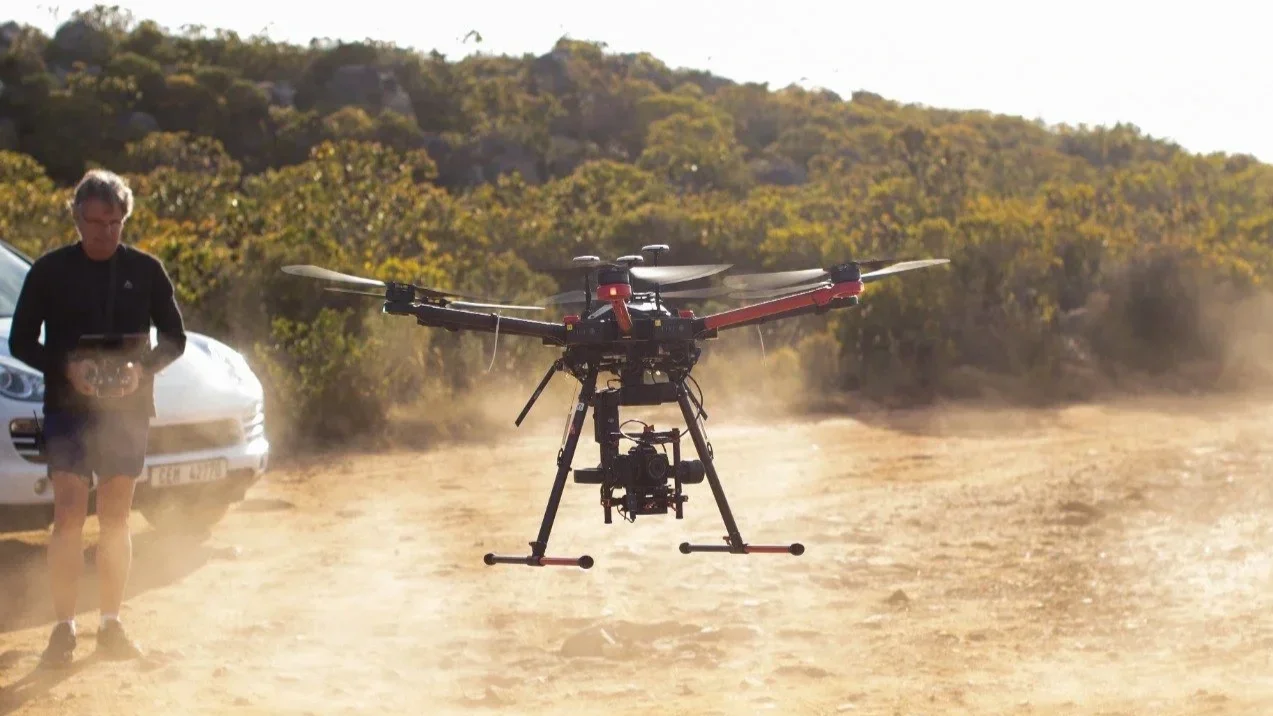
Your shoot days are packed. Departments are moving, light is changing quickly, and nobody wants extra takes just to feed post. Drone scanning solves a real problem in that chaos. It captures big locations quickly, gives VFX and art reliable geometry, and fits around camera without becoming the main event. In South Africa, the combination of film friendly crews and varied locations makes it a smart first choice. Below is a practical guide, written for busy producers and supervisors who want clean results with minimal fuss.
Where drone scanning really helps on a production
Think of drone scanning as fast aerial photogrammetry. We fly planned paths, capture high overlap images, then reconstruct them into meshes, point clouds, and textured assets. It shines when you need coverage, context, and usable textures.
Best use cases
Exterior sets, or large environments or locations inaccessible for for lidar scanning.
Strengths you can count on
Rapid coverage over complex geometry
Natural textures that help lookdev move faster
Camera paths and positions that support matchmove when planned with control
Known challenges
Vegetation that moves in wind can soften detail
Glass and glossy metal reduce feature matching
Interiors (that’s what Lidar is for)
Night work needs extra planning for light and safety
When any of those show up, we adjust. Ground photogrammetry can fill texture gaps. Lidar can lock in exact geometry, drone scans can cover vast distances. A hybrid plan often gives the best result, and it does not have to slow you down.
Permits, airspace, and safety in South Africa
South Africa is production savvy, but airspace rules still matter. The quickest path is simple. Share the location pins, dates, and any nearby sensitive sites. We confirm the airspace class, advise on what is permitted, and handle the paperwork where required.
Typical planning steps
Confirm coordinates and check airspace and local bylaws.
Secure landowner permission and production approvals.
Choose takeoff zones that do not interfere with unit movement.
Plan flight heights and paths around blocking and lighting.
Set weather and wind thresholds that keep results consistent.
Brief the AD team so lock ups are short and predictable.
On set safety habits
A licensed pilot and a dedicated visual observer for every flight
Clear cones and signage for takeoff and landing
Battery and craft checks on a fixed schedule
Direct radio comms with the floor and VFX
Separate card wrangling to avoid media mix ups
The aim is to capture what you need, stay out of frame, and be packed by the time the unit moves.
Photogrammetry, lidar, or both
Photogrammetry builds geometry from images. Lidar measures geometry with laser. Both belong in modern VFX scanning.
Why drone photogrammetry
Fast capture over wide areas
Rich textures pulled from real lighting
Strong geometry when overlap and control are planned well
Why lidar
Precise measurements on hard edges and interiors
Stable results in tricky light
Survey style alignment that matchmove teams trust
When to pair them
City blocks with glass, metal, and shadowed alcoves
Hero entrances that must stitch perfectly with interiors
Mixed locations that need one coordinate frame
In practice, we fly for coverage and textures, then run lidar on problem zones, doorways, and hero surfaces. Everything is aligned into one scene so layout, lookdev, and matchmove work from a single source of truth.
Planning the capture, a friendly playbook
Good scanning starts in prep. A little clarity here saves hours in post.
Before the shoot
Share dates, call times, and a short location brief.
Flag any hero areas where texture fidelity matters most.
Send available plans, elevations, or concept art.
Confirm whether VFX wants absolute scale and survey control.
Tell us what will move during the day, for example crowd barriers or vehicles.
Flight plan basics
70 to 85 percent overlap, with varied headings for strong tie points
Crosshatch and orbit paths around hero structures
Lower passes for parallax and texture, higher passes for coverage
Ground control points or surveyed markers if you need absolute accuracy
A fixed scale reference in frame so everyone agrees on size
Lighting tips
Bright overcast gives even textures and minimal shadows
In sun, plan more than one pass to manage shadow direction
Avoid strong wind that shakes trees, flags, and soft goods
Same day QC
Quick field reconstructions to test coverage before the unit moves
Re fly any gaps while the location is still locked
Snapshot control point errors to confirm accuracy targets
Dual backups of media before wrap
Deliverables that drop straight into pipeline
Every department wants something slightly different. We package so teams can ingest without a long back and forth.
Standard delivery set
Aligned, decimated mesh for layout, FBX or OBJ
High resolution textured mesh for lookdev, OBJ or USD with tidy texture sets
Clean point cloud, unified when aerial and lidar are combined
Georeferenced orthomosaic and digital surface model when requested
Camera positions and lens metadata, including EXIF and flight logs
Logical scene hierarchy with consistent naming and units
A short readme that explains coordinate system, scale, and versioning
Helpful options
Control point report with simple error stats
Low resolution proxy meshes for editorial and previz
Downscaled textures for quick reviews
Turntable renders for stakeholder sign off
If your pipeline has preferred units, up axis, or naming, tell us early. We will match it so your team does not have to convert anything.
A handoff checklist you can reuse
Copy this into your production notes. It keeps deliverables consistent across departments.
Location name and shoot date
On set VFX contact for follow ups
File tree with version numbers and dates
Units and up axis, for example meters and Z up
Coordinate origin, for example surveyed point or local origin
One known distance used to validate scale
Camera intrinsics and distortion data if available
Software and version used for reconstruction
Any known issues, for example reflective glass on one facade
Clear next steps, for example art to use interior lidar only
Budget and schedule, what actually shifts cost
Drone scanning is efficient, but a few things move the number and the timeline.
Number of locations or units per day
Airspace complexity and any special permits
Flight time and battery cycles needed for coverage
Whether you add ground photogrammetry or lidar for a hybrid plan
Control point survey time if you need absolute accuracy
Turnaround speed for reconstruction and cleanup
Delivery formats and the number of feedback rounds
If you share dates, a rough site size, and any accuracy targets, we can scope a plan that fits your schedule and avoids surprises.
Cape Town case note, a practical example
A recent job needed a textured model of a heritage street in central Cape Town. Surfaces varied a lot. Old stone, new glass, narrow alleys, and overhangs. We split the capture into two windows to control light. Early morning for the east faces, late afternoon for the west. Aerial photogrammetry gave us full coverage and textures. Tripod lidar handled doorways, glossy shopfronts, and deep recesses.
We placed a small set of ground control points along the block and documented one known distance for scale validation. After reconstruction, we aligned aerial and lidar data, decimated where it made sense, and delivered three packages. A layout mesh with light textures for speed. A high resolution textured mesh for lookdev. A unified point cloud for matchmove. Control point errors landed within the tolerance agreed in prep, and the team dropped the assets into their pipeline without rework. Most important, the capture ran between takes. Camera stayed on schedule.
FAQ
Do we need full lock ups during flights?
Not always. With a safe launch zone and well planned paths, we can often fly around the action. Short lock ups help during low passes or orbits near talent.
What weather do you need?
Light wind and steady light are ideal. Bright overcast is perfect. In sunny conditions we plan extra passes to manage shadows. Heavy rain or high winds will shift the plan.
How fast is the turnaround?
For a single location with standard outputs, previews are usually ready within a few days. Full textured assets and point clouds follow after internal QC and cleanup.
Will drone scanning replace lidar?
No. Drone scanning brings speed and textures. Lidar locks in exact measurements. The combination is often the sweet spot.
Can you scan interiors?
Sometimes. Large, safe spaces can work for micro drones. Many interiors are better with tripod lidar and ground photogrammetry.
The takeaway
Use drone scanning to cover big areas quickly and give every department the context they need. Pair it with lidar where precision matters. Plan your flights with control points, validate coverage before wrap, and deliver in the formats your pipeline expects. Do that, and you will reduce fixes, protect the schedule, and keep your crew focused on the shoot.
Next step
Send your dates, a short location brief, and any accuracy targets. We will recommend a capture plan that balances drone scanning, lidar, and ground photogrammetry, then deliver a package your team can use on day one.